Top 10 Tips for Optimizing Your Juniper Network Switch Performance
In today's fast-paced digital landscape, optimizing network performance has become paramount for organizations aiming to maintain competitive advantage. A significant portion of network reliability hinges on the efficiency of hardware, with switches like the Juniper Network Switch playing a vital role in ensuring seamless data communication across platforms. According to recent reports from networking industry experts, misconfigured switches can lead to performance degradation, with downtime costing businesses up to $5,600 per minute. This statistic underscores the importance of maximizing the potential of your Juniper Network Switch to enhance overall network efficiency.
Additionally, 82% of IT professionals identify network performance as crucial for the success of business operations, stressing the need for optimized configurations. By focusing on strategic enhancements and adopting best practices tailored for the Juniper Network Switch, organizations can significantly improve data throughput, minimize latency, and ensure better scalability. This guide will explore the top ten tips for optimizing your Juniper Network Switch performance, enabling your network infrastructure not only to meet current demands but to adapt to future challenges in an ever-evolving technological environment.

Understanding Juniper Network Switch Architecture for Performance Gains
Understanding the architecture of Juniper network switches is critical for maximizing their performance capabilities. A well-structured switch design facilitates efficient data handling, leading to reduced latency and enhanced throughput. According to a report by the International Data Corporation (IDC), optimizing network device performance can improve overall network health by up to 30%, which can significantly impact business operations. Key architectural features to leverage include high-bandwidth connections and advanced packet processing, which allow for seamless integration of additional services without noticeable degradation.
One effective tip for optimizing switch performance is to regularly update the firmware of your device. Keeping firmware up-to-date ensures that you benefit from the latest performance enhancements and security fixes. Additionally, consider implementing VLANs to segment traffic efficiently. This not only enhances security but also helps in managing bandwidth effectively. Furthermore, monitoring your switch's performance metrics is essential; tools that provide real-time analytics can help identify bottlenecks and inform your capacity planning, further optimizing switch functionalities and overall network operation.
Incorporating these practices can lead to significant performance gains, as illustrated in current findings from the Networking Industry Association (NIA), which indicate organizations that proactively manage their network infrastructure report up to a 50% reduction in downtime. Understanding and applying these architectural principles and performance tips can empower businesses to harness their networks' full potential.
Network Switch Performance Metrics
Analyzing Bandwidth Utilization and Traffic Flow Management Techniques
Effective bandwidth utilization and traffic flow management are crucial components in optimizing network performance, especially in environments relying on switch technology. According to recent industry reports, approximately 30% of network capacity often goes underutilized due to inefficient traffic management. Implementing a robust traffic flow strategy can significantly enhance bandwidth efficiency, leading to better application performance and reduced latency.
Techniques such as
Quality of Service (QoS) policies can prioritize critical applications, ensuring that they receive the necessary bandwidth even during peak usage.
Additionally, analyzing bandwidth utilization patterns can provide insights into traffic behavior, allowing for strategic adjustments. Utilizing tools that offer real-time monitoring and comprehensive analytics can help network administrators identify
bottlenecks and areas of congestion. A study by the
Network Performance Monitoring Association indicates that adopting proactive bandwidth management can result in
performance improvements of up to 50%. This highlights the importance of
data-driven decisions in managing traffic flow. By employing these techniques, organizations can not only optimize their network switch performance but also enhance the overall user experience.
Implementing Quality of Service (QoS) for Enhanced Network Performance
Implementing Quality of Service (QoS) (QoS) strategies in your network can significantly enhance performance, especially when dealing with high-traffic environments. QoS allows you to prioritize certain types of traffic, ensuring that critical applications receive the necessary bandwidth while minimizing delays and packet loss. This is particularly important for voice and video applications, which require stable and high-quality transmission for optimal user experience.
One essential tip for optimizing QoS is to classify and label your network traffic effectively. By understanding the different types of data traversing your network, you can assign appropriate priority levels. Utilizing methods such as traffic classification can help identify essential applications that require guaranteed service levels, allowing you to allocate resources where they are needed most.
Another key aspect of QoS implementation is monitoring and adjusting your configurations regularly. Network conditions can change frequently, so it’s vital to review performance metrics and adjust your QoS policies accordingly. This proactive approach will ensure that your network remains efficient and responsive to varying demands, leading to a smoother overall experience for users. Implementing a systematic review process can help you detect issues early and make the necessary adjustments to maintain optimal performance.
Regular Firmware Updates: A Key to Boost Switch Functionality
Regular firmware updates are essential for maintaining and enhancing the functionality of your network switches. Just as software applications need periodic updates to fix bugs and improve performance, network switch firmware is no exception. These updates often come with new features, security patches, and performance enhancements that can vastly improve the efficiency of your network. By keeping your firmware current, you ensure that your switch is equipped to handle the latest protocols and data traffic requirements, positioning your network for optimal performance.
In addition to improving functionality, regular firmware updates can also significantly boost network security. Cyber threats are constantly evolving, and manufacturers consistently release updates to address vulnerabilities that may be exploited by malicious actors. By ensuring your network switch is running the latest firmware, you minimize the risk of security breaches that can potentially compromise sensitive data and disrupt operations. Moreover, regular updates help in maintaining compliance with industry standards, which is crucial for organizations that handle sensitive information. Keeping a routine schedule for firmware updates can lead to a more stable and secure networking environment, enabling your organization to focus on its core objectives without the constant worry of network failures or breaches.
Top 10 Tips for Optimizing Your Juniper Network Switch Performance
| Tip |
Description |
Frequency |
Impact on Performance |
| Regular Firmware Updates |
Keeping firmware up-to-date to ensure security and functionality. |
Monthly |
High |
| Monitor Network Traffic |
Analyze data flows to spot bottlenecks and unusual patterns. |
Weekly |
Medium |
| Optimize Spanning Tree Protocol |
Tune STP settings to minimize convergence time. |
Quarterly |
High |
| Implement Quality of Service (QoS) |
Prioritize network traffic to improve performance for critical applications. |
Ongoing |
Very High |
| Use Link Aggregation |
Combine multiple network connections for increased throughput. |
As needed |
High |
| Configure VLANs Effectively |
Segment network traffic to enhance performance and security. |
As needed |
Medium |
| Regular Hardware Checks |
Inspect physical components to ensure optimal functioning. |
Monthly |
Medium |
| Implement Redundancy |
Set up backup systems to ensure reliability and uptime. |
As needed |
Very High |
| Keep Documentation Updated |
Ensure network configurations and changes are well documented. |
Ongoing |
Medium |
| Train Staff Regularly |
Ensure team is knowledgeable about latest technologies and practices. |
Biannually |
High |
Utilizing SNMP for Effective Monitoring and Performance Metrics Analysis
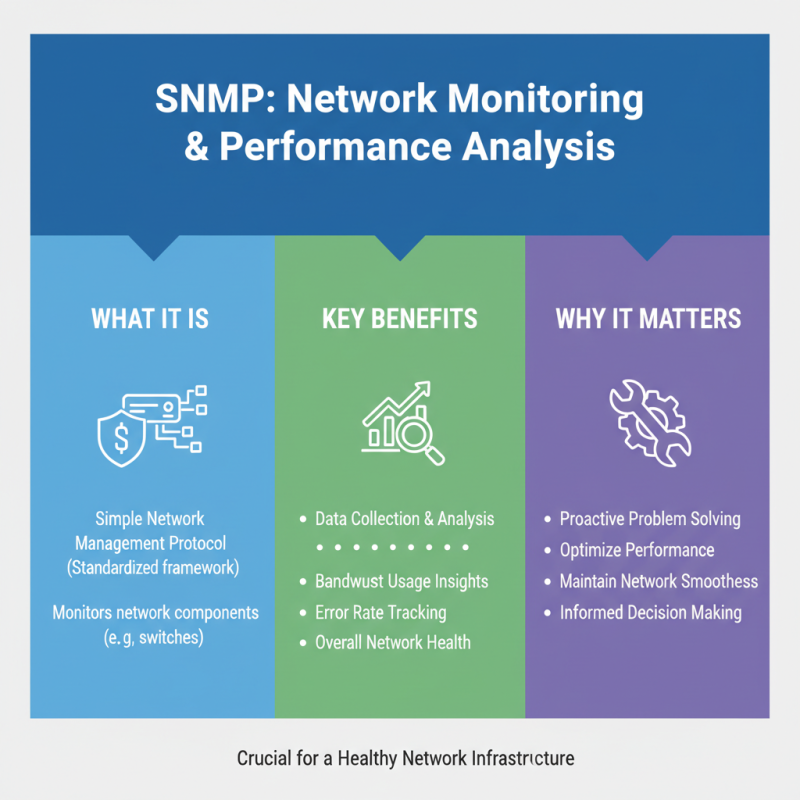
Utilizing SNMP for Effective Monitoring and Performance Metrics Analysis is crucial for keeping your network running smoothly. The Simple Network Management Protocol (SNMP) provides a standardized framework for monitoring various components within your network switch, making it easy to collect, analyze, and act upon performance data. By implementing SNMP, network administrators can gain insights into bandwidth usage, error rates, and overall health of the switch, which is essential for maintaining optimal performance.
To optimize your Juniper network switch performance, one effective tip is to regularly configure SNMP traps. These traps notify you in real-time about critical events, allowing for prompt reactions to potential issues before they escalate. Additionally, setting up proper SNMP community strings ensures that only authorized personnel have access to sensitive data, bolstering the security of your monitoring efforts.
Another key tip is to utilize performance metrics gathered through SNMP to establish baseline data. By understanding typical performance levels, you can easily identify anomalies and address them proactively. This practice not only helps in troubleshooting but also in forecasting future network needs, significantly improving the management of network resources and ensuring that your switch operates at peak performance.